by Patrix | Jun 12, 2026
The best way I know to get better at AI right now is also the most obvious one: ask AI to teach you.
I don’t mean that in a cute, circular way. I mean it very literally. If you want to understand what large language models are, ask one to explain them at your current level. If you want to build an agentic system, ask one to walk you through the pieces. If you hit a term you don’t understand, stop and ask. If the answer is too technical, say that. If it’s too basic, say that too.
That is the part people still seem to underestimate. AI is unusually good at adjusting to the person in front of it.
I’ve been getting more requests lately from friends and family who want me to hand-hold them through AI. Not just “what’s ChatGPT?” anymore, but how to actually use it, how to think about agents, how to set up workflows, how to keep up with the pace of all this. I get why they ask. AI is moving so quickly that even if you’re paying attention, it feels like drinking through a firehose.
But that’s also why I don’t really have the bandwidth to become everyone’s personal AI tutor. And perhaps more importantly, I may not be the best tutor!
The advice I keep wanting to give is: use the thing itself.
Start with one question you genuinely care about. Not “teach me AI,” because that’s too broad. Try something like: “Explain AI agents to me like I’m comfortable with computers but not a programmer.” Or: “I want to use AI to organize my notes. What do I need to understand first?” Or: “Give me a beginner path for learning how people are using AI in creative work.”
Then keep correcting it.
That’s the part that matters. Don’t treat the first answer as the lesson. Treat it like the beginning of a conversation. Tell it what confused you. Ask for an example. Ask it to compare the idea to something you already know. Ask it to quiz you. Ask it to make a tiny project you can actually try.
A human teacher can do that too, of course. A good one can do it beautifully. But a human teacher has limited time, patience, and availability. AI doesn’t mind if you ask the same question five different ways. It doesn’t mind if you need the simpler version, then the slightly more technical version, then the “okay, now show me what this looks like in practice” version.
That makes it weirdly useful for self-teaching.
And for AI specifically, the feedback loop is even better because the tool you’re learning about is the same tool you’re using to learn. You’re not just reading about prompts. You’re writing them. You’re not just hearing that AI can adapt to context. You’re watching it adapt to you. You’re not just learning what an agentic workflow might be. You can ask it to help you sketch one for your own actual life.
That last part is where things start to click. AI stops being a vague category of “new tech” and becomes a working material. More like Photoshop, a camera, a synthesizer, or a programming language. You don’t really learn it by having someone explain every menu item. You learn it by trying to make something, getting stuck, and asking better questions.
So if you’re trying to understand AI, don’t wait until you feel ready. Pick a thing you want to know or make, then make AI teach you the next step.
Not the whole mountain. Just the next step.
by Patrix | May 22, 2026
The most interesting argument in AI right now isn’t about which chatbot gives the best answer. It’s about what kind of prediction should sit at the center of intelligence.
The LLM path says, roughly: learn from enormous amounts of language, predict the next token extremely well, then use scale, tools, multimodality, and reinforcement learning to turn that into something useful. That path has already changed the way a lot of us write, code, search, brainstorm, and work. I use these systems every day, and I don’t think you can honestly call them a parlor trick anymore.
Yann LeCun’s JEPA path starts from a different itch. What if the core problem isn’t generating the next word, or even the next pixel? What if the core problem is learning an internal model of the world, one that can understand what matters in a scene, predict what might happen next, and plan actions before taking them?
That’s the part that grabbed me. JEPA feels less like “make the chatbot smarter” and more like “give the machine a mental sketchpad for reality.”
The short version of JEPA
JEPA stands for Joint Embedding Predictive Architecture. The phrase is clunky, but the idea is surprisingly clean once you get past the acronym.
In a typical generative setup, a model tries to reconstruct or generate the thing itself. A language model predicts the next token. An image or video generator may predict missing pixels, frames, or patches. The model is rewarded for getting the observable surface right.
JEPA does something different. It predicts in representation space. Instead of asking a model to fill in every pixel of a missing part of an image or video, JEPA asks it to predict the abstract representation, or embedding, of the missing part. In LeCun’s 2022 position paper, he describes JEPA as non-generative in this specific sense: it doesn’t try to generate the target directly. It tries to capture the dependency between one thing and another by predicting the target’s representation.
That sounds subtle, but it changes the job. If you’re watching a video of a tree, you probably don’t need to predict the exact position of every leaf a fraction of a second later. That detail is mostly noise. You care that the tree is there, that the wind is moving it, that a branch might block the path, that a person walking behind it may be partly hidden. JEPA is built around the idea that a useful world model should be allowed to ignore unpredictable details and focus on the parts of the world that matter for understanding and action.
This is why Meta’s V-JEPA work has centered on video. Video is a brutal test for this idea because the physical world is messy, continuous, and full of irrelevant detail. Pixel-perfect prediction is expensive and often beside the point. Latent prediction, meaning prediction in an abstract learned space, gives the model permission to learn the structure underneath the mess.
What LLMs are good at, and where LeCun thinks they hit a wall
Large language models are usually trained to predict the next token in a sequence. That description can sound dismissive, so it needs a little care. “Next-token prediction” does not mean the system only learns grammar or autocomplete tricks. At modern scale, predicting text well forces a model to absorb a shocking amount of structure from the data: facts, styles, relationships, programming patterns, social conventions, math tricks, fragments of reasoning, and all the weird compressed residue of human culture that shows up in text.
That’s why LLMs feel magical. Text is not just text. It’s a record of what humans noticed, argued about, built, measured, feared, wanted, and explained. A model trained on enough of it can become an eerily useful interface to that record.
LeCun’s objection is not that LLMs are useless. His argument is that text is not enough for human-level or animal-level intelligence. In his 2022 paper, he points out that much of common sense doesn’t live in language at all. A child doesn’t need a paragraph about gravity every time a cup gets pushed toward the edge of a table. They learn from watching, touching, moving, failing, and trying again.
That distinction matters. LLMs can write a good explanation of why the cup will fall. A world model should help a robot avoid knocking it off the table in the first place, or imagine the result of nudging it before the nudge happens.
This is where JEPA is aimed. Not at replacing language models for writing blog posts or answering questions, but at building systems that learn from sensory experience and can use that learning for prediction and planning.
JEPA is not just a theory anymore
LeCun laid out the broader vision in “A Path Towards Autonomous Machine Intelligence” in 2022. That paper proposed a system built around self-supervised learning, predictive world models, intrinsic objectives, and hierarchical representations. At the time, a lot of it read like a research agenda rather than a finished technology.
Since then, Meta FAIR and collaborators have been turning pieces of that agenda into working models.
I-JEPA, introduced in 2023, applied the idea to images. The model learned by predicting representations of target blocks in an image from a context block, instead of reconstructing pixels. The paper reported strong downstream performance with efficient training, including training a ViT-Huge model on ImageNet in under 72 hours using 16 A100 GPUs.
V-JEPA, released in February 2024, moved the idea into video. Meta described it as a non-generative model that predicts masked parts of a video in an abstract representation space. The key claim was efficiency: compared with generative approaches that try to fill in every missing pixel, V-JEPA could discard unpredictable information and improve training and sample efficiency.
Then V-JEPA 2 arrived in 2025, and the work became much more concrete. Meta described it as a 1.2 billion parameter world model trained primarily on video. The technical report says V-JEPA 2 was pretrained on more than 1 million hours of internet video and 1 million images, then post-trained with less than 62 hours of unlabeled robot video from the DROID dataset to create an action-conditioned world model, V-JEPA 2-AC.
That second stage is the important turn. The model isn’t just learning to recognize what’s in a clip. It learns to predict future representations conditioned on actions, which makes it useful for planning. In Meta’s demos and report, V-JEPA 2-AC could do zero-shot robot planning for tasks like reaching, grasping, and pick-and-place in new environments, using goal images and model-predictive control.
As of March 2026, the latest major step I found is V-JEPA 2.1. That paper focuses on dense visual understanding. Instead of only applying the prediction loss to masked tokens, V-JEPA 2.1 uses a dense predictive loss where both visible and masked tokens contribute to training. It also adds deep self-supervision across intermediate layers and multi-modal tokenizers for images and videos. The reported results include stronger object-interaction anticipation, action anticipation, depth estimation, navigation, and a 20-point real-robot grasping improvement over V-JEPA 2-AC.
That’s still research, not a consumer product. But it is not just a philosophical complaint about chatbots anymore.
The real difference: words versus worlds
The cleanest way I can explain the difference is this:
An LLM learns the structure of language so well that language becomes an interface to knowledge.
JEPA tries to learn the structure of the world so well that prediction becomes an interface to action.
Those are not the same ambition.
The LLM approach is strongest where the world has already been translated into tokens: documents, code, transcripts, chat logs, diagrams with captions, databases, tool outputs, and the giant sedimentary layer of internet text. You give it a prompt, it produces a continuation. With enough scaffolding, that continuation can become a plan, a program, an image prompt, a query, or an action through a tool.
The JEPA approach is strongest where the world is not naturally text-shaped. Video, robotics, movement, physical causality, object permanence, occlusion, touch, sound, and timing are all awkward to squeeze into a token stream. You can tokenize anything if you try hard enough, but LeCun’s argument is that the generative-token approach is a bad fit for continuous high-dimensional reality.
This is also why JEPA can sound less immediately impressive than an LLM. A chatbot talks back. A JEPA model may produce an embedding you can’t inspect directly. That makes the demo problem harder. If a language model writes a paragraph, you can judge it. If a world model predicts a future latent state, you need downstream tests: Can it classify the action? Can it anticipate what happens next? Can it guide a robot arm? Can it stay robust when the video is noisy, occluded, or physically tricky?
That’s a less flashy kind of intelligence. But it might be closer to the kind we use when we move through the world.
The approaches are already blending
The easy version of this story is “LLMs are one camp, JEPA is the other.” The current research is messier, and more interesting.
V-JEPA 2 itself can be aligned with a language model for video question answering. That means the JEPA-trained video encoder can provide grounded visual representations, while the language model provides the interface for questions and answers. In other words, language doesn’t disappear. It becomes the way we talk to a model that learned part of its understanding from video.
There is also an ICLR 2026 paper called “LLM-JEPA: Large Language Models Meet Joint Embedding Predictive Architectures,” coauthored by Hai Huang, Yann LeCun, and Randall Balestriero. The paper asks whether language training can borrow JEPA-style embedding-space objectives. Their reported results say LLM-JEPA can outperform standard LLM training objectives across several datasets and model families.
That complicates the argument in a good way. JEPA may not be a replacement for LLMs so much as a missing ingredient. Maybe the future system has language models for communication, JEPA-style world models for perception and prediction, memory systems for persistence, planning modules for action, and tools for doing real work. That sounds less like one giant model and more like an architecture.
LeCun has been arguing for that kind of architecture for years. His move away from Meta into Advanced Machine Intelligence, announced in late 2025, makes the bet even more explicit. The new company is reportedly focused on AI systems that understand the physical world, have persistent memory, reason, and plan complex action sequences. That is almost a direct continuation of the JEPA/world-model program.
Why artists and builders should care
Here’s the ArtsyGeeky angle for me: LLMs gave us a creative partner that can talk. JEPA points toward creative systems that can watch.
That difference is huge.
A language model can help write a concept statement, generate code for an interactive piece, critique a photo series, or brainstorm a weird installation idea. That’s already useful. But it mostly works through description. You translate the work into words, and the model translates words back into suggestions.
A world-model approach hints at something else. Imagine a creative tool that understands the motion of a dancer, not just the caption attached to the video. Or a camera assistant that can anticipate where a subject is moving, not just identify what is in the frame. Or a robot fabrication tool that can reason about how material bends, slips, blocks, collapses, or responds to pressure. Or an editing system that understands continuity, cause and effect, and physical plausibility in footage, not just scene labels.
I’m not saying V-JEPA 2.1 gives us that tomorrow. It doesn’t. The current work is still mostly benchmark-driven and robotics-focused. But the direction feels different from “ask the chatbot to describe the image.” It points toward tools that understand process, motion, and consequence.
For creative technology, that could matter a lot.
The caveats matter
There are plenty of reasons to stay cautious. JEPA models still need better long-horizon planning. Meta’s V-JEPA 2 blog says future work includes hierarchical JEPA models that can reason across multiple temporal and spatial scales, plus multimodal JEPA models that include senses like audio and touch. That is a polite way of saying the current models are still limited.
The robotics results are also early. A robot arm doing pick-and-place with novel objects is meaningful, but it is not general intelligence. Benchmarks can improve faster than real-world reliability. And because JEPA representations are abstract, it can be harder for outsiders to see exactly what the model has learned.
LLMs are not standing still either. The best systems are already multimodal, tool-using, memory-augmented, and increasingly agentic. The next few years probably won’t be a clean victory for one paradigm. They will be a negotiation between approaches.
Still, JEPA gives a name and a technical shape to a discomfort a lot of people have with LLM-only AI. The world is not made of words. Words are one beautiful, powerful projection of the world, but they are not the thing itself.
The bet
LeCun’s bet is that intelligence needs a world model. Not just a bigger pile of text. Not just a better chatbot. A system that can learn from observation, predict in abstraction, ignore irrelevant detail, and plan before acting.
The LLM bet has already paid off in public. We can use it. We can argue with it. We can see its strengths and its weird failure modes every day.
The JEPA bet is earlier and quieter. It lives in embeddings, video encoders, robot arms, masked regions, and benchmarks with names that sound like lab equipment. But it is trying to answer a deeper question: can a machine learn the hidden structure of the physical world well enough to act in it?
That is why I keep coming back to it. The next phase of AI may not be about making machines that talk more convincingly. It may be about making machines that can look at the world and know what is likely to happen next.
And if that works, the chatbot era may end up looking like the first sketch, not the finished painting.
by Patrix | May 14, 2026
Most note systems fail in the same boring way: they become storage. You save an article. You jot down a good idea. You paste in a quote that felt important at the time. Then, three weeks later, the whole thing may as well be gone. Technically it exists. Practically, it has left the building.
That is the part of second brain systems I care about most. Not the perfect folder structure. Not the productivity aesthetic. The actual question is much simpler: can this thing help me think, brainstorm, organize my life, or even run a business? That question has changed in the last year, because a second brain no longer has to be just a well-organized personal knowledge base. It can become something more active: a folder of notes that an AI agent can read, search, edit, summarize, schedule around, and gradually learn how to improve and maintain.
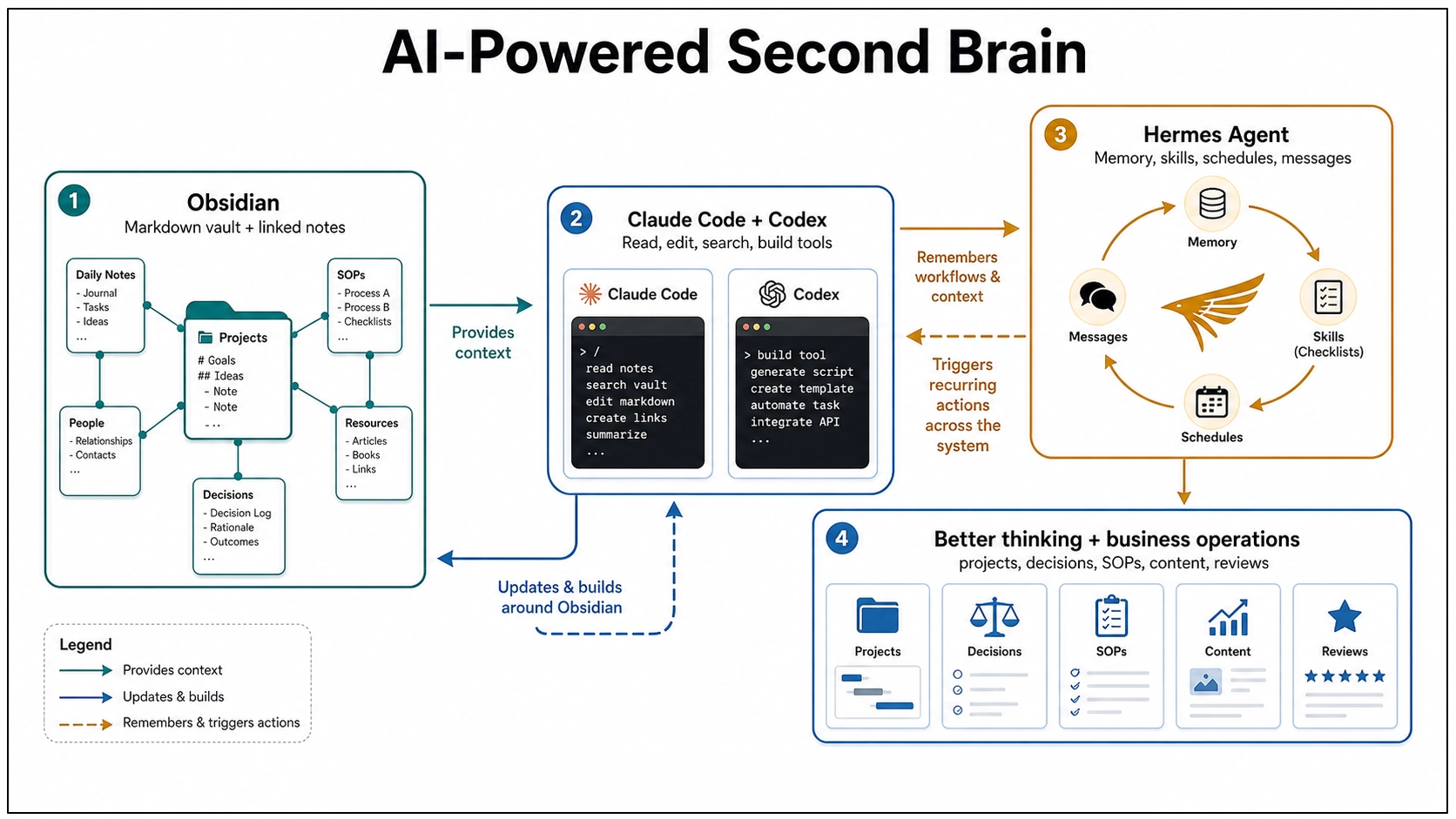
That is where Obsidian, Claude Code, Codex, and Hermes Agent start to become more than a pile of shiny tools. Put together carefully, they point toward a personal working memory you can actually build with.
Part One: Building a Second Brain for One Person
The foundation is still Obsidian. It works so well for this because your notes are Markdown-formatted plain text files stored in a vault, which is just a folder on your computer. That sounds almost too plain to matter, but it matters a lot. You own the files, which means they can be backed up, synced, opened in another editor, searched by normal tools, and worked on by AI agents without needing some fragile export. And, importantly, these files are local, private and not subject online connectivity or security issues.
Obsidian gives you the friendly surface: links between notes, backlinks, graph view, plugins, templates, canvas, and all the little affordances that make note-taking feel alive. But the real trick is underneath. The second brain is not trapped inside a proprietary database. It is sitting there as text, which makes it legible to machines.
The old version of a second brain was mostly passive. You captured things so your mind did not have to carry them. Projects went in one place, areas of life went in another, durable ideas became topic notes, and decisions got written down with the context you had at the time. That is still useful. Very useful. But it is mostly a memory system.
AI changes the job description. Instead of asking, “Where did I put that note?” you can ask, “What do I already know about this?” Instead of manually cleaning every rough capture, you can ask an AI agent to normalize it, link it, and suggest where it belongs. Instead of staring at a project folder wondering what the next move is, you can ask for the current state, the blocker, and the next useful action. That is the jump: the system starts helping you operate and coordinate, not just remember.
Why Claude Code Fits So Naturally
Claude Code is officially a coding tool, but the interesting part here is not the word “code.” The interesting part is that it reads a working folder, edits files, runs commands, and follows project instructions. An Obsidian vault is a working folder, so Claude Code can treat your notes almost like a codebase. It can read the context before acting, search across files, update a note in place, follow a checklist, and use a root instruction file to learn the rules of the system.
This is where a vault starts feeling less like a filing cabinet and more like a studio assistant. Not a boss. Not an oracle. A very fast assistant with access to your shelves.
The pattern is simple:
- Inbox notes are raw material.
- Project notes describe outcomes, blockers, and next actions.
- Topic notes hold synthesized understanding.
- Decision notes preserve options, tradeoffs, and rationale.
- Templates and checklists teach the system what “good” looks like.
Once those pieces exist, the AI has something to work with. It is no longer responding to a blank prompt. It is operating inside a system, and that difference is huge.
Where Codex Fits
Codex sits next to Claude Code in an interesting way. OpenAI describes Codex as a coding agent that can read, edit, and run code, with cloud tasks that can work in the background and in parallel. That is obviously useful for software projects, but the shape of the tool matters for knowledge work too.
If your second brain lives in a Git-backed folder, a repo, or a structured workspace, Codex can help with the work around the knowledge system: building scripts, cleaning data, creating small tools, maintaining documentation, testing automations, or turning repeated manual steps into repeatable commands. Claude Code is very natural as a local collaborator inside the vault. Codex becomes especially interesting when the second brain starts growing tooling around itself.
For one person, that could mean:
- A script that finds stale project notes.
- A dashboard that shows open decisions and neglected areas.
- A weekly review generator that checks recent files and drafts a review.
- A small importer that turns saved articles, transcripts, or CSVs into clean Markdown notes.
- A local browser app that makes the vault easier to inspect.
This is the part where the second brain becomes a little bit handmade. Not just notes. Notes plus tools. And that feels right to me, because a personal knowledge system should not be one-size-fits-all. It should slowly become more like the person using it.
Hermes Agent Adds the Learning Layer
Claude Code and Codex can work inside a folder. Hermes Agent pushes the idea in a slightly different direction: what if the agent itself keeps learning how you work? Hermes Agent is an open-source agent framework from Nous Research. It runs in terminal, messaging platforms, and IDEs. It can use different model providers, connect to tools through plugins and MCP servers, schedule work, and run through messaging gateways like Telegram, Discord, Slack, WhatsApp, Signal, Matrix, and email.
The part that matters for a second brain is memory plus skills. Hermes can persist reusable procedures as skills. If it solves a complex problem, discovers a workflow, or gets corrected, that knowledge can become a skill document that loads into future sessions. It also supports persistent memory about preferences, environment details, and lessons learned. That is a big deal, because a normal AI session forgets too much. You explain the same preference again. You correct the same mistake again. You describe your folder structure again. You say, again, “No, that kind of note belongs over there.”
A Hermes-style layer points toward a different future: the agent learns the workflow once, then gets better at repeating it.
For a one-person second brain, Hermes could become the background operator:
- Watch for new inbox notes and suggest routes.
- Turn repeated cleanup patterns into skills.
- Run a weekly vault maintenance pass.
- Send a mobile message when a scheduled review is ready.
- Use local models for private work and cloud models when deeper reasoning is needed.
- Maintain different profiles for personal notes, writing, coding, and research.
That is not magic. It is still software, and software can make a mess if you give it too much freedom too quickly. But the direction is exciting. The second brain stops being just an archive you visit. It becomes an environment with an assistant that remembers how the environment works.
The Human Part Still Matters
This is where I would be careful. AI agents are great at reducing overhead, but they are not a substitute for taste, judgment, priority, or meaning. I would not let an agent freely reorganize my whole vault. I would not let it delete notes without review. I would not treat every generated connection as true just because it sounds tidy.
The best version is more grounded: you capture, the system holds, the agent helps, and you decide. That is already enough to be useful.
Part Two: Running a Small Business With the Same System
The personal version has already been extremely useful to me. But the small business version might be where this gets really interesting, because a small business is basically a second brain problem with money attached. You have projects, customers, marketing ideas, invoices, product notes, content drafts, operating procedures, vendor details, old decisions, future plans, random observations, and a hundred tiny things you swear you will remember and absolutely will not.
Most of that information ends up scattered across email, text messages, spreadsheets, task apps, Google Docs, browser bookmarks, and someone’s memory. That works until it doesn’t. The usual failure mode is not that the business has no information. It has too much information in too many places, and none of it is connected. The website person knows one thing. The bookkeeper knows another. The owner has the important detail in their head. The customer’s actual preference is buried in a message thread from six months ago.
An Obsidian-based operating system gives the business a place to put its working memory. Not as a replacement for accounting software, a CRM, project management tools, email, or shared drives. Those still have their jobs. The vault becomes the connective tissue between them, the place where the story of the business lives.

What Goes in the Business Brain
I would start with a structure like this:
- Inbox for raw captures.
- Projects for active work with a finish line.
- Customers or Clients for relationship context and preferences.
- Operations for SOPs and repeatable workflows.
- Marketing for content ideas, campaigns, offers, and positioning.
- Decisions for meaningful choices and the reasoning behind them.
- Library for source material, reference docs, vendor notes, and research.
- Archive for completed or inactive material.
That is not complicated. Good. A small business does not need a cathedral of knowledge management. It needs a place where useful information can stop evaporating.
Each active project can have a note with the goal, current status, blocker, files, links, and next action. Each client can have a note with preferences, promised follow-ups, useful history, and current open loops. Each SOP can describe how the work is actually done, including the weird exception that only one person remembers. That last part is gold, because small businesses run on undocumented knowledge. The owner knows how to handle that one vendor. The assistant knows which customer hates phone calls. The designer knows where the logo files really are. The technician knows which step always breaks. An AI-readable vault gives those details a place to land.
What the Agents Can Do for the Business
Claude Code can work directly inside the business vault. It can update SOPs, draft project briefs, clean meeting notes, summarize customer history, create checklists, and help keep the folder structure honest. Codex can build the helper tools around the system: a tiny dashboard, a script that checks which projects have no next action, a report generator, a sync tool, a content calendar exporter, or a small internal app that lets someone fill out a form and save the result as Markdown.
Hermes Agent can sit closer to the rhythm of the business. Because Hermes has persistent memory, skills, messaging gateways, profiles, cron scheduling, and provider switching, it can become the layer that remembers and repeats the operating routines:
- Every Friday, summarize active projects and open customer follow-ups.
- When a voice memo comes in through a messaging app, turn it into an inbox note.
- When a workflow gets repeated three times, suggest turning it into an SOP.
- When a customer asks a question that keeps coming up, flag it as a content idea.
- When an SOP changes, ask whether related checklists or templates need updates.
- Use a cheaper local model for simple routing and a stronger cloud model for strategy or writing.
That is not replacing the owner. It is giving the owner a better memory and a steadier operations assistant. For a one-person business, that might be the difference between “everything is in my head” and “the business can actually see itself.” For a small team, it might mean fewer repeated explanations, cleaner handoffs, and less of that awful feeling where nobody knows whether something was done, promised, forgotten, or merely discussed.
The Content Angle Is Sneakily Powerful
For a business that publishes anything, this system gets even more useful. A good content strategy is usually hiding inside the business already. It is in customer questions, sales calls, support emails, project retrospectives, seasonal patterns, objections, wins, mistakes, and the little observations people make while doing the work. Most businesses lose that material, but an AI-readable second brain gives you a place to capture it.
Then, when it is time to write a blog post, newsletter, product update, FAQ, social post, or case study, you are not starting with “write something about our business.” You can ask:
- “What have customers been asking this month?”
- “What project taught us something worth sharing?”
- “Which objections keep showing up before someone buys?”
- “What do we know now that we did not know six months ago?”
That is a much better starting point. Less generic. More lived-in.
Start Small or It Will Collapse
The temptation with this kind of system is to design the whole machine on day one. I would not. Start with one person and one folder: Inbox. Capture real things for a week: customer questions, project notes, business ideas, meeting scraps, voice memos, links, complaints, and tiny process reminders.
Then add one weekly review. Ask the AI to help sort the inbox into Projects, Customers, Operations, Marketing, Decisions, and Library. After that, add one recurring business ritual:
- Monday project scan.
- Friday customer follow-up review.
- Monthly content idea review.
- Quarterly decision review.
Only after that would I add Hermes scheduling, messaging, skills, and automation. Not because those are unimportant, but because automation only helps when the underlying pattern is real. Automating a fake workflow just makes the fake workflow louder.
The payoff is not some futuristic autonomous company. It is much simpler: the business starts remembering itself. And once that happens, a lot of work gets less mysterious.
The Interesting Part
This is why I keep coming back to the second brain idea. The tools are finally catching up to the metaphor. Obsidian gives the brain a durable body: plain text files you own. Claude Code and Codex give it hands: the ability to read, edit, build, and maintain the surrounding system. Hermes Agent gives it habits: memory, skills, schedules, profiles, and messages that carry the system across sessions and devices.
The human still supplies the taste, the priorities, the final call, and the sense of what actually matters. But the overhead starts to shrink. For one person, that means your notes can become more than a graveyard. For a small business, it means the business can start holding onto its own intelligence.
That is the version of AI that interests me most: not a chatbot that gives advice from nowhere, but a working memory you can build with and improve.
by Patrix | Apr 30, 2026
Something about Qwen3.6 stuck with me when I read through the release notes: it has a switch. Not a metaphorical one. A literal toggle between thinking mode and non-thinking mode. You decide, per conversation, whether you want the model to reason through a problem or just respond.
That sounds like a minor feature. It’s not.
Most local AI models are a single gear. You give them a prompt, they generate tokens, done. Qwen3.6 introduces a hybrid reasoning mode that works through complex problems step by step, then carries that reasoning trace into the next turn if you want it to. Or you can turn it off entirely for faster, more conversational responses.
The mechanics are cleaner than they sound. Thinking mode is for hard problems: code, math, reasoning chains where you want the model to show its work before committing to an answer. Non-thinking mode is for everything else, where speed matters more than depth. And there’s a third option called “Preserve Thinking” that keeps the reasoning trace alive across the entire conversation, so the model builds on what it already reasoned through rather than starting cold each turn. In practical terms, that means fewer tokens spent re-deriving context — reportedly around a 40% reduction in token usage on complex agentic workflows, with no measurable accuracy loss.
The architecture behind this is worth a brief look. Qwen3.6 combines linear attention with sparse mixture-of-experts routing. What that means in practice: it retains context more efficiently than standard attention models, which is why you get 256K context without the usual degradation at longer sequences. The thinking toggle sits on top of this architecture rather than requiring a separate model endpoint. One model, one download, two modes. That keeps the implementation clean in a way that matters when you’re running this locally.
I’ve been setting up local models on the Mac Mini M4 Pro, and the 27B variant is the one worth paying attention to here. At 4-bit quantization it weighs 18GB, which fits comfortably in 24GB unified memory. On the M4 Max, the closest available benchmark to the M4 Pro, Q4_K_M quantization runs at around 16 tokens per second. Fast enough for real work. One practical note if you’re pulling GGUFs manually: use Q4_K_M, not IQ4_XS. There’s a known llama.cpp/Metal regression that drops IQ4_XS performance to around 5 tokens per second on Apple Silicon. Q4_K_M sidesteps it entirely.
The benchmark numbers are also unusual for a 27B model. On SWE-bench Verified, a coding test that involves actually solving real GitHub issues, Qwen3.6-27B scores 77.2%. That matches or beats Qwen’s own 397B parameter model on major agentic coding benchmarks, despite having 14 times fewer total parameters. The architecture is doing real work there, not just compressing the same capability into a smaller shell.
One honest caveat: Qwen3.6 doesn’t run in Ollama yet. The multimodal components use separate projection files that Ollama’s current architecture doesn’t handle. You’ll need llama.cpp or Unsloth Studio. Unsloth Studio installs with a single curl command and auto-configures inference parameters when you select the model. MLX quants are also available for Apple Silicon if you want a more native Mac experience, though llama.cpp with Metal support is fast enough that the practical difference is small.
The question that interests me more than the setup: when do you actually want an AI to think? Not as a philosophical exercise. As a practical decision you make before sending each message. Thinking mode takes longer and burns more tokens. Non-thinking mode is faster but shallower. Most of the time the right answer is obvious in retrospect, but Qwen3.6 forces you to have an opinion about it upfront.
Most AI tools don’t ask you to think about how they think. This one does. You’re not just prompting — you’re choosing whether to engage the model’s reasoning machinery or route around it. That’s an unfamiliar position if you’re used to treating local models as fast autocomplete. For structured tasks with clear requirements, thinking mode earns its slower response time by reasoning through edge cases the model would otherwise skip. For quick Q&A, non-thinking mode is the right call. The sweet spot I’m most curious about is agentic workflows, where toggling thinking mode per subtask could cut token costs significantly without sacrificing quality on the steps that actually need careful reasoning.
Worth installing. Worth testing. Particularly if you have a 24GB Mac and you’ve been looking for a local model that doesn’t feel like a compromise.
by Patrix | Mar 11, 2026
You gave it a shot. You typed something into Claude or ChatGPT, got back something that was technically correct but felt flat. Generic. The kind of output that could have come from anyone. You wondered what everyone was so excited about.
Here’s what I’ve figured out: that experience isn’t evidence that AI tools are overhyped. It’s diagnostic. It tells you exactly where you are in a progression, and that progression has six levels.
Level 1 Is Where Almost Everyone Starts (And Where Too Many People Stop)
At Level 1, you’re using the tool like a search engine with extra steps. You type a command. It responds. You type another command. It responds. It’s a one-way relationship. You’re directing, it’s executing. And here’s what happens when you run any AI system that way: it defaults to the mean. Average outputs, average aesthetics, average thinking. That’s why so many AI-generated websites have the same purple gradient and the same generic fonts. That’s where “AI slop” comes from. Not from the model being bad — from the interaction being shallow.
The good news: you don’t have to stay there.
The Six Levels of Claude Code Fluency
A practitioner named Chase put together the clearest framework I’ve seen for thinking about this progression. It’s framed around Claude Code specifically, but the underlying arc applies to any AI tool you’re learning seriously.
- Level 1, Prompt Engineer: Commands only. One-way. Generic outputs.
- Level 2, Planner: You start asking instead of just telling. Collaborative questions, back-and-forth, letting the AI push back on your ideas.
- Level 3, Context Engineer: You learn that what you feed the AI shapes what you get. Context management, examples, constraints. Less is often more.
- Level 4, Tool User: You extend the AI with external tools like web scraping, browser automation, and deployment pipelines. You also start understanding the building blocks of what you’re creating, not just the output.
- Level 5, Skill Author: You turn your best workflows into reusable, personalized skills. The tool starts working the way you work.
- Level 6, Orchestrator: Multiple AI instances working in parallel, handling different parts of a problem simultaneously. You’re the manager now.
Most people are at Level 1. A lot of people make it to Level 2 or 3 before plateauing. Levels 4 through 6 are where the real compounding happens.
This Is Exactly How Learning Any Craft Works
When you pick up a guitar for the first time, it sounds terrible. That’s not evidence the guitar is a bad instrument. It’s evidence that you’re at the beginning of a skill curve that takes time to climb. The gap between “making sound” and “playing music” is enormous. Crossing it requires understanding that there are levels, that they’re learnable, and that the early frustration is part of the process.
AI fluency is the same. The first stage, “I can make it say things,” is the equivalent of plucking a string. It works. It produces output. But it’s nowhere near what the instrument can do.
The frustrating thing about AI tools right now is that nobody hands you a roadmap. You’re expected to figure out the levels on your own, in a space that’s changing fast enough to make even experienced practitioners feel like they’re behind.
The Thing to Try Next
You don’t need to get to Level 6 to feel the difference. The jump from Level 1 to Level 2 is the biggest one, and it comes down to a single habit shift: stop commanding and start asking.
Instead of “build me a website,” ask: “What questions do you have before we start?” Instead of “write me a post about X,” ask: “What’s missing from my brief?” Let the AI push back. Ask it what you haven’t thought of.
That shift — from director to collaborator — is where the tool stops feeling like a fancy autocomplete and starts feeling like something genuinely useful.
The craft is worth learning. The map is there. You’re probably closer to the interesting part than you think.