by Patrix | May 25, 2025
That awkward strip of land on the side of your house? It’s got serious potential. Whether it’s sun-drenched or shady, wild or weedy, you can turn it into a thriving little oasis—with some help from AI.
Using AI to plan and visualize your garden isn’t just for tech geeks. It’s for anyone who wants to skip the overwhelm and start digging with confidence. Let’s walk through how to design a side garden the smart way—guided by your creativity and assisted by AI.
Why Use AI for Garden Planning?
Good gardening is part art, part science. AI helps fill in the science-y bits so you can focus on the fun stuff—like choosing your color palette, imagining how it will smell in summer, or figuring out how to cram one more tomato plant into a too-small bed.
With just a few prompts, AI can help you:
- Pick plants that match your space and climate
- Design a layout that maximizes sun, airflow, and beauty
- Generate images to visualize the finished garden
- Create a planting and maintenance calendar
- Troubleshoot problems as your garden grows
Step 1: Describe Your Garden Space to AI
Start with ChatGPT or your preferred AI assistant. Give it a simple description of your space, like:
Help me plan a small side garden that’s about 3 feet wide and 12 feet long. It gets 5–6 hours of sun in the afternoon. I live in San Luis Obispo, and I’d like mostly low-maintenance plants that attract bees and butterflies.
Within seconds, you’ll have a suggested list of plants, ideas for layout, and maybe even soil tips. You can refine your request as much as you want: add a color theme, focus on edibles, or ask for deer-resistant options. AI won’t get tired of your follow-up questions.
Step 2: Generate a Visual of Your Future Garden
Once you have a general idea of what you want to grow, you can create an image of your imagined garden using AI tools — and yes, ChatGPT is one of them.
If you’re using ChatGPT with image generation (like the Plus plan with DALL·E built in), you can simply type something like:
Create an image of a narrow side yard garden with raised beds, blooming lavender and salvia, and a stepping stone path. There’s a wooden fence on one side and sunlight coming in from the left. Use a 3:2 aspect ratio.
ChatGPT will generate a custom image for you right in the chat. You can tweak the prompt until it matches your vision—add vertical elements, more color, or change the season.
If you don’t have image generation in ChatGPT, you can copy your prompt into tools like DALL·E (via Bing), or Midjourney. The goal is the same: bring your garden idea to life before you touch a trowel.
This is like having a virtual sketchpad for your green dreams—instantly adjustable and surprisingly inspiring.
Step 3: Let AI Help with Layout and Spacing
Spacing is one of the trickiest parts of planning a small garden. AI can help you figure out how to avoid crowding while still packing in the plants. Ask it:
How far apart should I plant lavender, yarrow, and oregano if I want a natural, cottage-style look?
It can even suggest companion plants or warn you about species that don’t play well together. You can also ask it to generate a simple grid-style layout to print or sketch onto your site plan.
Step 4: Build a Planting Calendar
Want to know when to plant your seeds or transplant your starts? AI can help create a customized calendar based on your location and plant list. Try:
Give me a monthly planting and maintenance schedule for a pollinator-friendly side garden in USDA Zone 9b.
You’ll get a timeline for planting, pruning, fertilizing, and even harvesting—without digging through a dozen different websites.
Step 5: Add a Bit of Tech to Your Soil
If you enjoy the techy side of things, consider adding a few smart tools to your garden setup:
- Soil moisture sensors that sync with your phone
- Smart irrigation timers with weather-based scheduling
- AR plant ID apps to identify mystery weeds or track blooms
It’s a low-effort way to stay connected to your garden, even when life gets busy.
AI Empowers Gardeners
Planning a garden used to mean flipping through books, sketching diagrams, and hoping your choices would work. With AI, you can test ideas, refine plans, and even dream up alternate designs before committing a single seed to the soil.
And once it’s planted? You’ll still be the one watering, weeding, and pausing to watch the bees. But now you’ll know that every plant earned its spot—and your side yard won’t feel like a leftover space anymore.
by Patrix | May 24, 2025
What if the future of art isn’t about machines replacing humans — but machines whispering strange, beautiful ideas into our ears? Yeah, that sounds a little creepy, but hear me out.
This is the path more artists are exploring as they embrace AI, not as a crutch, but as a muse. Amidst the controversy over AI-generated images that mimic living artists’ styles, a quieter revolution is happening. Creatives are using tools like ChatGPT, Sora, and Claude to provoke their own imagination, not outsource it.
Welcome to the new studio: part sketchpad, part silicon oracle.
The AI as Collaborator
Let’s be honest: it’s easy to feel threatened by AI’s ability to crank out music, images, and prose with disturbing speed. But what’s getting lost in the noise is how many artists are using these tools in a slower, more intimate way.
Think of ChatGPT not as an artist, but as a really intense, slightly surreal conversation partner. One who throws out wild metaphors, strange titles, unexpected color palettes, and story ideas that feel half-dreamed.
I once asked ChatGPT to give me names for imaginary art shows based on the theme “silence.” It came back with:
- The Geometry of Quiet
- Whispers of Secret Dreams
- Poetry of Butterflies
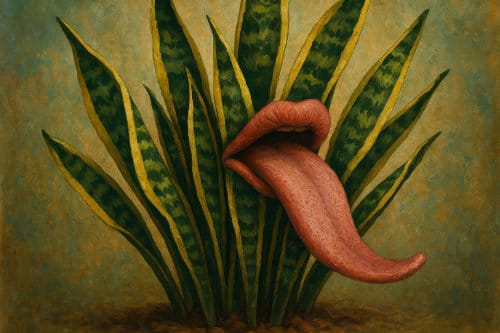
I then put “Whispers of Secret Dreams” into ChatGPT to create an image. This is what it created:

“Whispers of Secret Dreams”
Prompting as a Creative Ritual
Prompting a language model is part creative writing, part séance. Here are a few ways artists are using prompts as part of their daily practice:
For Writers:
- Ask for unusual metaphors for grief, joy, aging, or time.
- Request a dialogue between two imaginary creatures who live inside your closet.
- Generate random titles or first lines, then riff off them manually.
For Visual Artists:
- Feed it your own artist statement and ask it to give you surreal painting concepts based on your themes.
- Ask it to describe a dream landscape based on three emotions.
- Use it to “translate” music or poems into visual prompts.
For Musicians or Composers:
- Generate imaginary genres (“Ambient Baroque Punk” anyone?)
- Ask for a story or myth to base a suite or album around.
- Explore descriptions of unheard sounds, then try to recreate them.
In all cases, you’re not just accepting what the model spits out — you’re reacting to it, arguing with it, riffing off of it. Like jazz.
Real Artists Doing It Right
Some of my favorite examples of AI-as-muse come from creatives who treat it like a very peculiar studio assistant:
- A collage artist in Oregon who uses GPT to write poetic titles for their otherwise abstract pieces.
- A songwriter who brainstorms lyrics with Claude, then rewrites every single line to make it more personal.
- A digital painter who asks ChatGPT for “folk tales from a forgotten planet,” then illustrates them as storybook scenes.
None of them are blindly accepting the output. They’re wrestling with it. Which, honestly, is kind of the point.
The Soul Is in the Editing
If you’re worried about losing your creative identity to the machine — good. That worry means you care. It also probably means you won’t.
Because here’s the thing: real creativity doesn’t come from prompts. It comes from your response to the prompts. Your taste. Your weird inner logic. Your delight in breaking your own rules.
AI can offer the spark, but the fire? That’s yours.
Use the Machine For Your Art
If you’re an artist, you don’t have to reject AI outright. But you also don’t have to let it steal your spotlight. Use it like a mirror, a provocateur, a riddler.
Let it surprise you. Let it weird you out. Let it help you see something old in a new way.
But always remember: AI is not the artist. You are.
by Patrix | May 22, 2025
If you’re looking for a plant that checks all the boxes—easy to grow, nearly impossible to kill, purifies your air, and even produces oxygen at night—look no further than the Mother-in-Law’s Tongue, also known as the Snake Plant or Dracaena trifasciata (formerly Sansevieria trifasciata).
This sculptural beauty with its upright, sword-like leaves has earned a permanent spot in homes, offices, and minimalist design studios across the world. And it’s not just for looks. Let’s explore why this plant is more than just a pretty face.
A Champion of Air Purification
The Snake Plant was famously included in a NASA Clean Air Study, which found it capable of filtering out harmful indoor pollutants like:
- Formaldehyde (found in cleaning products and furniture)
- Benzene (from paints and plastics)
- Xylene and Toluene (from glues and varnishes)
While one plant won’t turn your home into a sterile lab, adding several can subtly improve indoor air quality—especially in enclosed spaces.
It Produces Oxygen
Unlike most plants that take a break from oxygen production when the sun goes down, the Snake Plant keeps working. Thanks to Crassulacean Acid Metabolism (CAM) photosynthesis, it opens its pores at night to absorb carbon dioxide and release oxygen.
This makes it one of the few plants that’s actually ideal for bedrooms. It quietly refreshes the air while you sleep.
Resilient and Nearly Indestructible
The Snake Plant thrives on neglect. That’s not a joke—it’s actually better to forget to water it than to overwater it.
- Watering: Every 2–4 weeks, depending on the humidity and temperature.
- Light: Prefers bright, indirect light but tolerates low light and even some direct sun.
- Soil: Needs well-draining soil—cactus or succulent mix is perfect.
- Pot: Use a pot with drainage holes to prevent root rot.
It’s drought-tolerant, pest-resistant, and adapts to a wide range of environments. Whether you live in a sun-drenched loft or a dim apartment, it won’t complain.
Easy to Propagate
Want more Snake Plants for free? You can easily propagate new plants from a single leaf. Just cut a healthy leaf, let the cut end dry for a day or two, and root it in water or soil. It’s a slow grower, but very rewarding.
One thing to note: if you’re propagating a variegated variety like Laurentii, the new plant may lose its yellow stripes. If you want an exact clone, use rhizome division instead of leaf cuttings.
Aesthetic Appeal
This plant adds structure and style to any room. Its tall, vertical form pairs well with modern, minimalist, or bohemian interiors. Whether potted in sleek ceramics or rustic baskets, it adds natural elegance without being flashy.
Pet Caution
One small downside: it’s toxic to cats and dogs if ingested. It’s not deadly, but can cause nausea or vomiting. Keep it out of reach if you have curious pets.
If you’re starting your plant journey, or just want something that offers real value without demanding your time, the Mother-in-Law’s Tongue is hard to beat. It’s more than décor—it’s a living, breathing air filter with timeless charm and effortless care.
Add one (or a few) to your home and let this green warrior quietly do its thing—no nagging required.
by Patrix | May 21, 2025
In a world where most digital tools seem designed to lure you in with a half-functioning free trial, it’s refreshing—almost shocking—to find something that’s fully useful without asking for your credit card. TradingView is one of those rare platforms. Whether you're watching the chaotic dance of crypto prices or tracking more traditional stocks, TradingView offers a robust, user-friendly experience that’s incredibly generous, even at the free tier.
I first stumbled into TradingView while trying to decode the rollercoaster ride of Bitcoin. I expected to get ten minutes of access before being locked out or pestered by pop-ups. Instead, I found myself using it daily—drawing trendlines, zooming through timeframes, and adding technical indicators—all without paying a cent.
One Tool for Two Worlds
One of TradingView’s most impressive traits is how seamlessly it handles both crypto and stock data. You don’t have to switch apps or juggle logins. From within a single interface, you can compare Apple’s stock performance against Ethereum’s, or view a candlestick chart for a niche altcoin right alongside the S&P 500.
For someone who dabbles in both worlds—as many curious investors now do—this unified experience is incredibly convenient. It removes a lot of the friction that typically comes with analyzing different asset classes. And it feels modern, too. The interface is sleek and intuitive, offering just the right balance between functionality and simplicity. You don’t need a finance degree to get started, but if you have one, it won’t feel dumbed down either.
The Free Version Is Surprisingly Capable
What makes the free version stand out isn’t just that it exists, but that it genuinely gives you what you need to start charting effectively. You get real-time price updates, access to a wide range of technical indicators, and the ability to draw and annotate directly on your charts. There are some limits, of course—like only being able to use one chart per tab and a few indicators at a time—but those constraints often serve to focus your analysis rather than hinder it.
In fact, for someone learning the ropes, having fewer bells and whistles can be a blessing. It encourages clarity and a more thoughtful approach. You start to pay attention to what really matters in a chart, rather than getting lost in a maze of overlapping indicators and settings.
A Social Twist on Charting
Another aspect of TradingView that caught me by surprise was its social layer. This isn’t just a charting tool—it’s a platform where people share trading ideas, comment on each other’s setups, and even publish custom indicators they’ve coded themselves. For a newcomer, it’s like having access to a virtual whiteboard filled with annotated market insights from around the world.
It’s not about following anyone blindly, of course, but seeing how other traders interpret the same data can sharpen your own thinking. You start to notice patterns, not just in the charts, but in how experienced traders communicate their reasoning.
When to Pay
Eventually, you might want more firepower—extra alerts, more charts on one screen, or access to advanced data feeds. But that’s a decision you can make slowly, and with intention. The great thing about TradingView is that you won’t feel forced into upgrading. It doesn’t feel like a bait-and-switch.
Personally, I stayed on the free plan far longer than I expected. And when I did upgrade, it was because I felt I had outgrown the basics—not because the basics were missing.
TradingView has done something rare: it has built a serious charting platform that’s accessible to everyone, from total beginners to full-time traders. And it didn’t cripple the free version to make a point. If you’re just getting into trading—or simply want to make sense of what the market is doing—this is a tool that respects your curiosity and doesn’t punish your budget.
Try it. Play around. See what patterns you notice. You might find yourself, as I did, quietly impressed—and grateful—that something this good still exists without a monthly fee.
by Patrix | May 21, 2025
Back in the day, the invention of the paint tube changed everything. Suddenly, artists didn’t need to grind their own pigments or stay indoors—they could take their easels outside and paint the world as they saw it. It was a small shift in materials, but a massive leap in creative possibility.
Oil paints were once controversial.
When photography first came on the scene, some folks speculated it would be the end of painting..
Today, we’re facing something similar with AI art. Tools like Midjourney, DALL·E, and Stable Diffusion have arrived on the scene, stirring up both excitement and concern. Some see these tools as threats to traditional artistry. Others see them as toys or shortcuts. But for many of us—especially those curious about the intersection of creativity and technology—they offer something far more nuanced: a new way to explore our imagination.
A Brush That Listens
At its core, AI art is collaborative. You don’t just click a button and get a masterpiece. You describe what you see in your mind’s eye. You experiment, revise, and refine. You coax the image into existence through prompts, much like a sculptor chips away at marble. The results often surprise you. Sometimes, they’re flat-out wrong. But that back-and-forth, that act of shaping and reacting, is the creative process.
It’s easy to underestimate the skill involved until you try it for yourself. Crafting the right prompt takes intuition, clarity, and persistence. It’s not unlike directing a team—except your “team” happens to be a statistical model trained on billions of images.
Standing on the Shoulders of Giants (and Algorithms)
It helps to remember that artists have always used the tools available to them. The camera obscura once seemed like a trick. Photoshop was once debated in the world of photography. Even the idea of digital painting was initially met with skepticism. And yet, each of these innovations opened up new forms of expression.
AI might feel different because it seems to “create” on its own. But it doesn’t. It mirrors patterns and reflects inputs—it needs a human guide. If anything, it holds up a mirror to your own imagination and asks, “Is this what you meant?” Often, the answer is no. So you adjust. Try again. And somewhere in that process, art happens.
Personal Notes from the Prompt Trenches
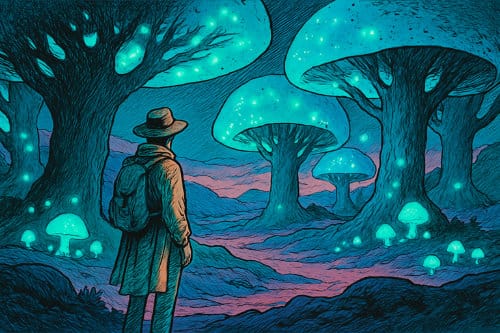
When I first started using Midjourney, I wasn’t trying to replace anything. I was just curious. I’d type in a phrase—something like “a lone figure under bioluminescent trees, painted in the style of Moebius”—and see what came back. Most of the time, the results weren’t quite right. But every so often, I’d get something that made me stop and stare. Not because it was perfect, but because it hinted at a story I hadn’t told yet. That moment of surprise—that’s the part that felt like art to me.
Over time, I began using AI not to finish work, but to start it. It became a sketchbook, a reference generator, a source of inspiration when I was stuck. It nudged me into new color palettes, strange compositions, and ideas I wouldn’t have thought of on my own.
A Tool, Not a Threat
None of this is to say that AI tools don’t raise serious questions—about authorship, copyright, originality. These are valid concerns, and we’ll need to grapple with them honestly. But dismissing AI outright, as if it’s cheating or lazy, misses the deeper truth: creativity has always been about making meaning with the tools we have. The brush changes, but the impulse to create, to express, to share—that doesn’t.
So maybe the real question isn’t whether AI art “counts.” Maybe it’s how we, as artists and humans, choose to use it.
Curious to try it for yourself?
Next time you feel a creative itch, try describing something impossible to an AI art generator. Not to show off or make a finished product—but to see what comes back. Treat it like a sketch, not a statement. You might just discover a new direction you hadn’t considered.
And if it feels weird or uncertain at first—that’s okay. Most good art does.