
Most note systems fail in the same boring way: they become storage. You save an article. You jot down a good idea. You paste in a quote that felt important at the time. Then, three weeks later, the whole thing may as well be gone. Technically it exists. Practically, it has left the building.
That is the part of second brain systems I care about most. Not the perfect folder structure. Not the productivity aesthetic. The actual question is much simpler: can this thing help me think, brainstorm, organize my life, or even run a business? That question has changed in the last year, because a second brain no longer has to be just a well-organized personal knowledge base. It can become something more active: a folder of notes that an AI agent can read, search, edit, summarize, schedule around, and gradually learn how to improve and maintain.
That is where Obsidian, Claude Code, Codex, and Hermes Agent start to become more than a pile of shiny tools. Put together carefully, they point toward a personal working memory you can actually build with.
Part One: Building a Second Brain for One Person
The foundation is still Obsidian. It works so well for this because your notes are Markdown-formatted plain text files stored in a vault, which is just a folder on your computer. That sounds almost too plain to matter, but it matters a lot. You own the files, which means they can be backed up, synced, opened in another editor, searched by normal tools, and worked on by AI agents without needing some fragile export. And, importantly, these files are local, private and not subject online connectivity or security issues.
Obsidian gives you the friendly surface: links between notes, backlinks, graph view, plugins, templates, canvas, and all the little affordances that make note-taking feel alive. But the real trick is underneath. The second brain is not trapped inside a proprietary database. It is sitting there as text, which makes it legible to machines.
The old version of a second brain was mostly passive. You captured things so your mind did not have to carry them. Projects went in one place, areas of life went in another, durable ideas became topic notes, and decisions got written down with the context you had at the time. That is still useful. Very useful. But it is mostly a memory system.
AI changes the job description. Instead of asking, “Where did I put that note?” you can ask, “What do I already know about this?” Instead of manually cleaning every rough capture, you can ask an AI agent to normalize it, link it, and suggest where it belongs. Instead of staring at a project folder wondering what the next move is, you can ask for the current state, the blocker, and the next useful action. That is the jump: the system starts helping you operate and coordinate, not just remember.
Why Claude Code Fits So Naturally
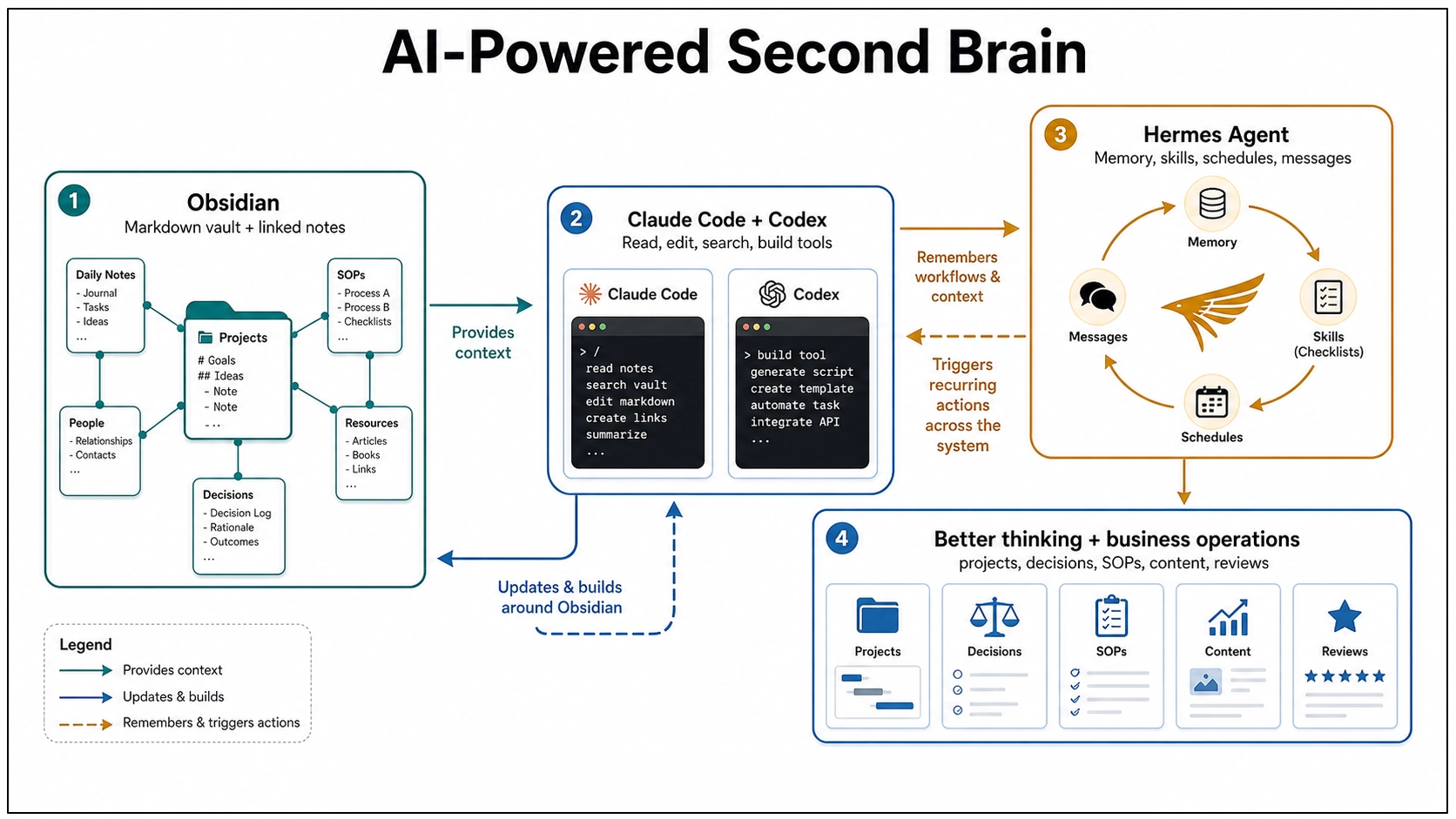
Claude Code is officially a coding tool, but the interesting part here is not the word “code.” The interesting part is that it reads a working folder, edits files, runs commands, and follows project instructions. An Obsidian vault is a working folder, so Claude Code can treat your notes almost like a codebase. It can read the context before acting, search across files, update a note in place, follow a checklist, and use a root instruction file to learn the rules of the system.
This is where a vault starts feeling less like a filing cabinet and more like a studio assistant. Not a boss. Not an oracle. A very fast assistant with access to your shelves.
The pattern is simple:
- Inbox notes are raw material.
- Project notes describe outcomes, blockers, and next actions.
- Topic notes hold synthesized understanding.
- Decision notes preserve options, tradeoffs, and rationale.
- Templates and checklists teach the system what “good” looks like.
Once those pieces exist, the AI has something to work with. It is no longer responding to a blank prompt. It is operating inside a system, and that difference is huge.
Where Codex Fits
Codex sits next to Claude Code in an interesting way. OpenAI describes Codex as a coding agent that can read, edit, and run code, with cloud tasks that can work in the background and in parallel. That is obviously useful for software projects, but the shape of the tool matters for knowledge work too.
If your second brain lives in a Git-backed folder, a repo, or a structured workspace, Codex can help with the work around the knowledge system: building scripts, cleaning data, creating small tools, maintaining documentation, testing automations, or turning repeated manual steps into repeatable commands. Claude Code is very natural as a local collaborator inside the vault. Codex becomes especially interesting when the second brain starts growing tooling around itself.
For one person, that could mean:
- A script that finds stale project notes.
- A dashboard that shows open decisions and neglected areas.
- A weekly review generator that checks recent files and drafts a review.
- A small importer that turns saved articles, transcripts, or CSVs into clean Markdown notes.
- A local browser app that makes the vault easier to inspect.
This is the part where the second brain becomes a little bit handmade. Not just notes. Notes plus tools. And that feels right to me, because a personal knowledge system should not be one-size-fits-all. It should slowly become more like the person using it.
Hermes Agent Adds the Learning Layer
Claude Code and Codex can work inside a folder. Hermes Agent pushes the idea in a slightly different direction: what if the agent itself keeps learning how you work? Hermes Agent is an open-source agent framework from Nous Research. It runs in terminal, messaging platforms, and IDEs. It can use different model providers, connect to tools through plugins and MCP servers, schedule work, and run through messaging gateways like Telegram, Discord, Slack, WhatsApp, Signal, Matrix, and email.
The part that matters for a second brain is memory plus skills. Hermes can persist reusable procedures as skills. If it solves a complex problem, discovers a workflow, or gets corrected, that knowledge can become a skill document that loads into future sessions. It also supports persistent memory about preferences, environment details, and lessons learned. That is a big deal, because a normal AI session forgets too much. You explain the same preference again. You correct the same mistake again. You describe your folder structure again. You say, again, “No, that kind of note belongs over there.”
A Hermes-style layer points toward a different future: the agent learns the workflow once, then gets better at repeating it.
For a one-person second brain, Hermes could become the background operator:
- Watch for new inbox notes and suggest routes.
- Turn repeated cleanup patterns into skills.
- Run a weekly vault maintenance pass.
- Send a mobile message when a scheduled review is ready.
- Use local models for private work and cloud models when deeper reasoning is needed.
- Maintain different profiles for personal notes, writing, coding, and research.
That is not magic. It is still software, and software can make a mess if you give it too much freedom too quickly. But the direction is exciting. The second brain stops being just an archive you visit. It becomes an environment with an assistant that remembers how the environment works.
The Human Part Still Matters
This is where I would be careful. AI agents are great at reducing overhead, but they are not a substitute for taste, judgment, priority, or meaning. I would not let an agent freely reorganize my whole vault. I would not let it delete notes without review. I would not treat every generated connection as true just because it sounds tidy.
The best version is more grounded: you capture, the system holds, the agent helps, and you decide. That is already enough to be useful.
Part Two: Running a Small Business With the Same System
The personal version has already been extremely useful to me. But the small business version might be where this gets really interesting, because a small business is basically a second brain problem with money attached. You have projects, customers, marketing ideas, invoices, product notes, content drafts, operating procedures, vendor details, old decisions, future plans, random observations, and a hundred tiny things you swear you will remember and absolutely will not.
Most of that information ends up scattered across email, text messages, spreadsheets, task apps, Google Docs, browser bookmarks, and someone’s memory. That works until it doesn’t. The usual failure mode is not that the business has no information. It has too much information in too many places, and none of it is connected. The website person knows one thing. The bookkeeper knows another. The owner has the important detail in their head. The customer’s actual preference is buried in a message thread from six months ago.
An Obsidian-based operating system gives the business a place to put its working memory. Not as a replacement for accounting software, a CRM, project management tools, email, or shared drives. Those still have their jobs. The vault becomes the connective tissue between them, the place where the story of the business lives.
What Goes in the Business Brain
I would start with a structure like this:
- Inbox for raw captures.
- Projects for active work with a finish line.
- Customers or Clients for relationship context and preferences.
- Operations for SOPs and repeatable workflows.
- Marketing for content ideas, campaigns, offers, and positioning.
- Decisions for meaningful choices and the reasoning behind them.
- Library for source material, reference docs, vendor notes, and research.
- Archive for completed or inactive material.
That is not complicated. Good. A small business does not need a cathedral of knowledge management. It needs a place where useful information can stop evaporating.
Each active project can have a note with the goal, current status, blocker, files, links, and next action. Each client can have a note with preferences, promised follow-ups, useful history, and current open loops. Each SOP can describe how the work is actually done, including the weird exception that only one person remembers. That last part is gold, because small businesses run on undocumented knowledge. The owner knows how to handle that one vendor. The assistant knows which customer hates phone calls. The designer knows where the logo files really are. The technician knows which step always breaks. An AI-readable vault gives those details a place to land.
What the Agents Can Do for the Business
Claude Code can work directly inside the business vault. It can update SOPs, draft project briefs, clean meeting notes, summarize customer history, create checklists, and help keep the folder structure honest. Codex can build the helper tools around the system: a tiny dashboard, a script that checks which projects have no next action, a report generator, a sync tool, a content calendar exporter, or a small internal app that lets someone fill out a form and save the result as Markdown.
Hermes Agent can sit closer to the rhythm of the business. Because Hermes has persistent memory, skills, messaging gateways, profiles, cron scheduling, and provider switching, it can become the layer that remembers and repeats the operating routines:
- Every Friday, summarize active projects and open customer follow-ups.
- When a voice memo comes in through a messaging app, turn it into an inbox note.
- When a workflow gets repeated three times, suggest turning it into an SOP.
- When a customer asks a question that keeps coming up, flag it as a content idea.
- When an SOP changes, ask whether related checklists or templates need updates.
- Use a cheaper local model for simple routing and a stronger cloud model for strategy or writing.
That is not replacing the owner. It is giving the owner a better memory and a steadier operations assistant. For a one-person business, that might be the difference between “everything is in my head” and “the business can actually see itself.” For a small team, it might mean fewer repeated explanations, cleaner handoffs, and less of that awful feeling where nobody knows whether something was done, promised, forgotten, or merely discussed.
The Content Angle Is Sneakily Powerful
For a business that publishes anything, this system gets even more useful. A good content strategy is usually hiding inside the business already. It is in customer questions, sales calls, support emails, project retrospectives, seasonal patterns, objections, wins, mistakes, and the little observations people make while doing the work. Most businesses lose that material, but an AI-readable second brain gives you a place to capture it.
Then, when it is time to write a blog post, newsletter, product update, FAQ, social post, or case study, you are not starting with “write something about our business.” You can ask:
- “What have customers been asking this month?”
- “What project taught us something worth sharing?”
- “Which objections keep showing up before someone buys?”
- “What do we know now that we did not know six months ago?”
That is a much better starting point. Less generic. More lived-in.
Start Small or It Will Collapse
The temptation with this kind of system is to design the whole machine on day one. I would not. Start with one person and one folder: Inbox. Capture real things for a week: customer questions, project notes, business ideas, meeting scraps, voice memos, links, complaints, and tiny process reminders.
Then add one weekly review. Ask the AI to help sort the inbox into Projects, Customers, Operations, Marketing, Decisions, and Library. After that, add one recurring business ritual:
- Monday project scan.
- Friday customer follow-up review.
- Monthly content idea review.
- Quarterly decision review.
Only after that would I add Hermes scheduling, messaging, skills, and automation. Not because those are unimportant, but because automation only helps when the underlying pattern is real. Automating a fake workflow just makes the fake workflow louder.
The payoff is not some futuristic autonomous company. It is much simpler: the business starts remembering itself. And once that happens, a lot of work gets less mysterious.
The Interesting Part
This is why I keep coming back to the second brain idea. The tools are finally catching up to the metaphor. Obsidian gives the brain a durable body: plain text files you own. Claude Code and Codex give it hands: the ability to read, edit, build, and maintain the surrounding system. Hermes Agent gives it habits: memory, skills, schedules, profiles, and messages that carry the system across sessions and devices.
The human still supplies the taste, the priorities, the final call, and the sense of what actually matters. But the overhead starts to shrink. For one person, that means your notes can become more than a graveyard. For a small business, it means the business can start holding onto its own intelligence.
That is the version of AI that interests me most: not a chatbot that gives advice from nowhere, but a working memory you can build with and improve.